An Open-Source IDE and Coding Agent Built for MiniMax
MiniMax M3 is state of the art among open-weight models with native vision, combining precise instruction following with a low hallucination rate. stagewise gives it a local IDE with a coding agent built for long-running work.



stagewise is a local IDE that ships with its own coding agent. It runs on your machine, connects to your development environment, and can orchestrate multiple agents in parallel. The runtime is model-agnostic, so you can use frontier models, open-weight models, or local inference. It also manages context aggressively, which matters once a task starts stretching across many turns. Learn more about stagewise.
Why MiniMax M3 stands out right now
MiniMax M3 does not top the benchmarks on raw intelligence, and it does not need to. It handles the daily coding tasks that make up most real work. It stands out in the properties that matter for agentic use.
State of the art among open-weight models with vision
MiniMax M3 is state of the art among open-weight models with native vision, which makes it well suited for frontend development and other graphics-related work. On the MMMU-Pro benchmark, its visual reasoning is competitive with top-tier models at a lower cost than frontier models with vision.
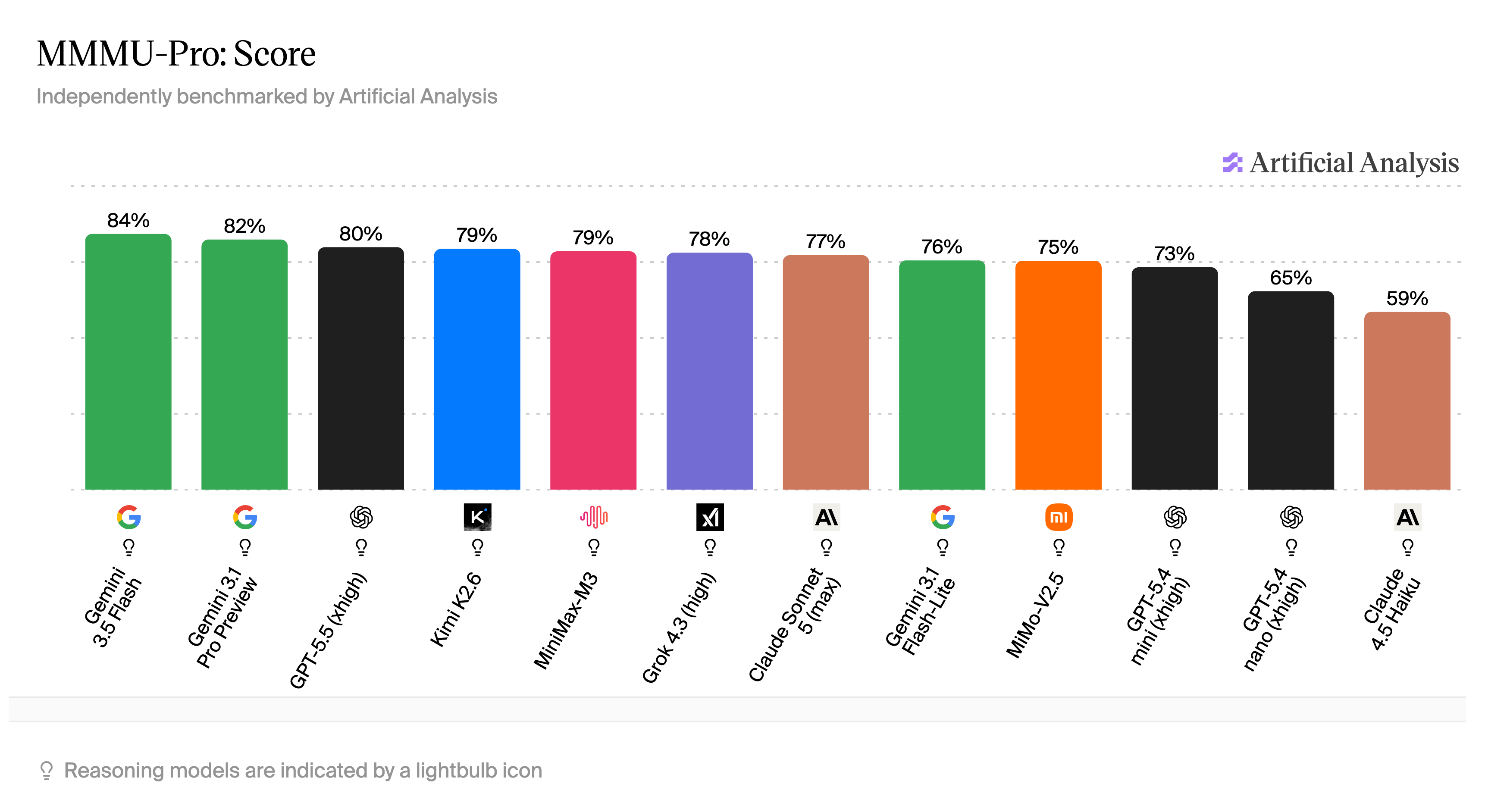
MMMU-Pro visual reasoning benchmark, via Artificial Analysis.
Strong instruction following, low hallucination
Instruction following and hallucination rate determine whether a model is reliable on long-running tasks. On the IFBench, MiniMax M3 scores high on instruction following. On the AA-Omniscience benchmark, it has a low hallucination rate. Both matter when a task runs for dozens of turns and the model needs to stay reliable.
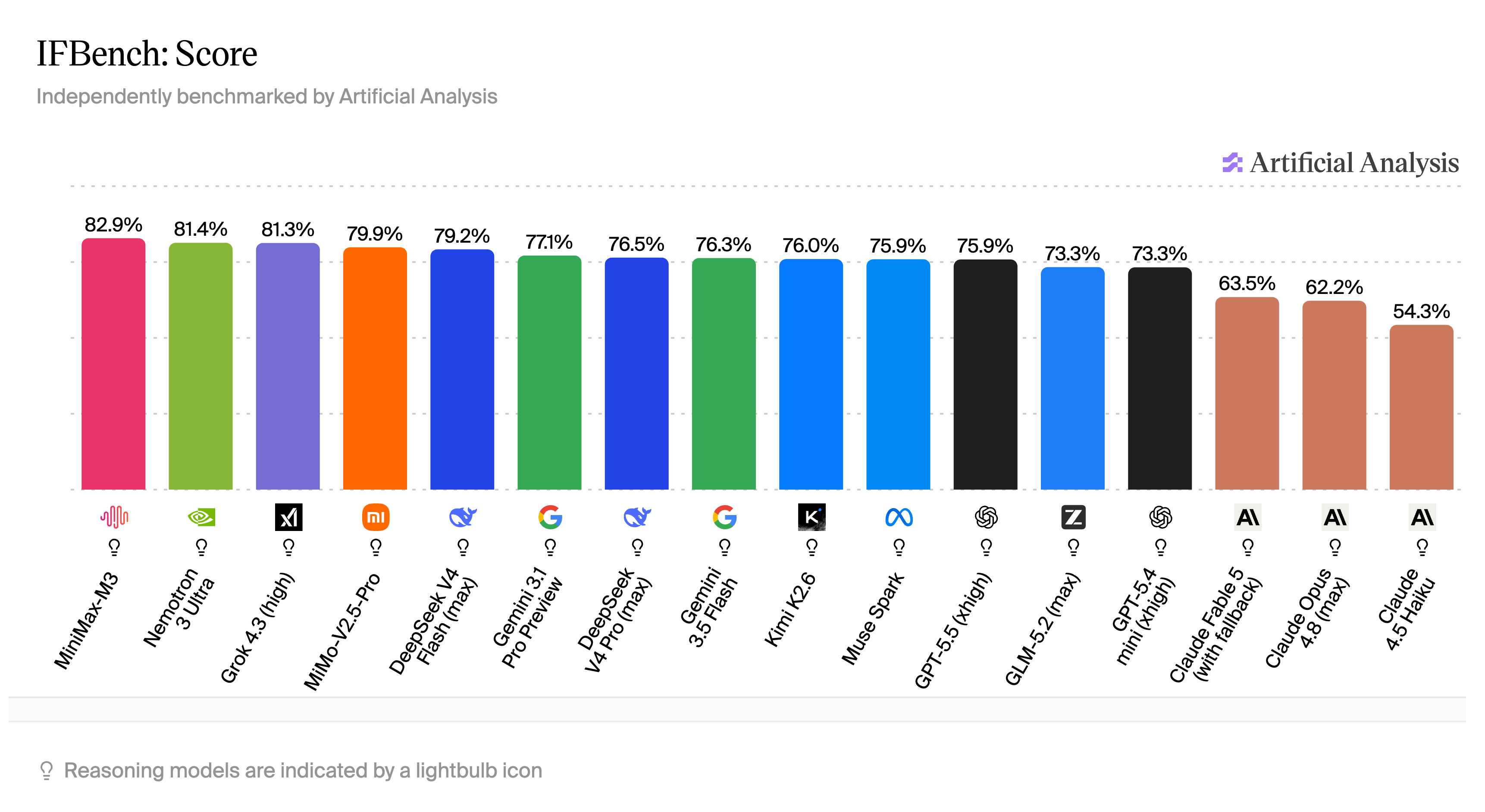
IFBench instruction following benchmark, via Artificial Analysis.
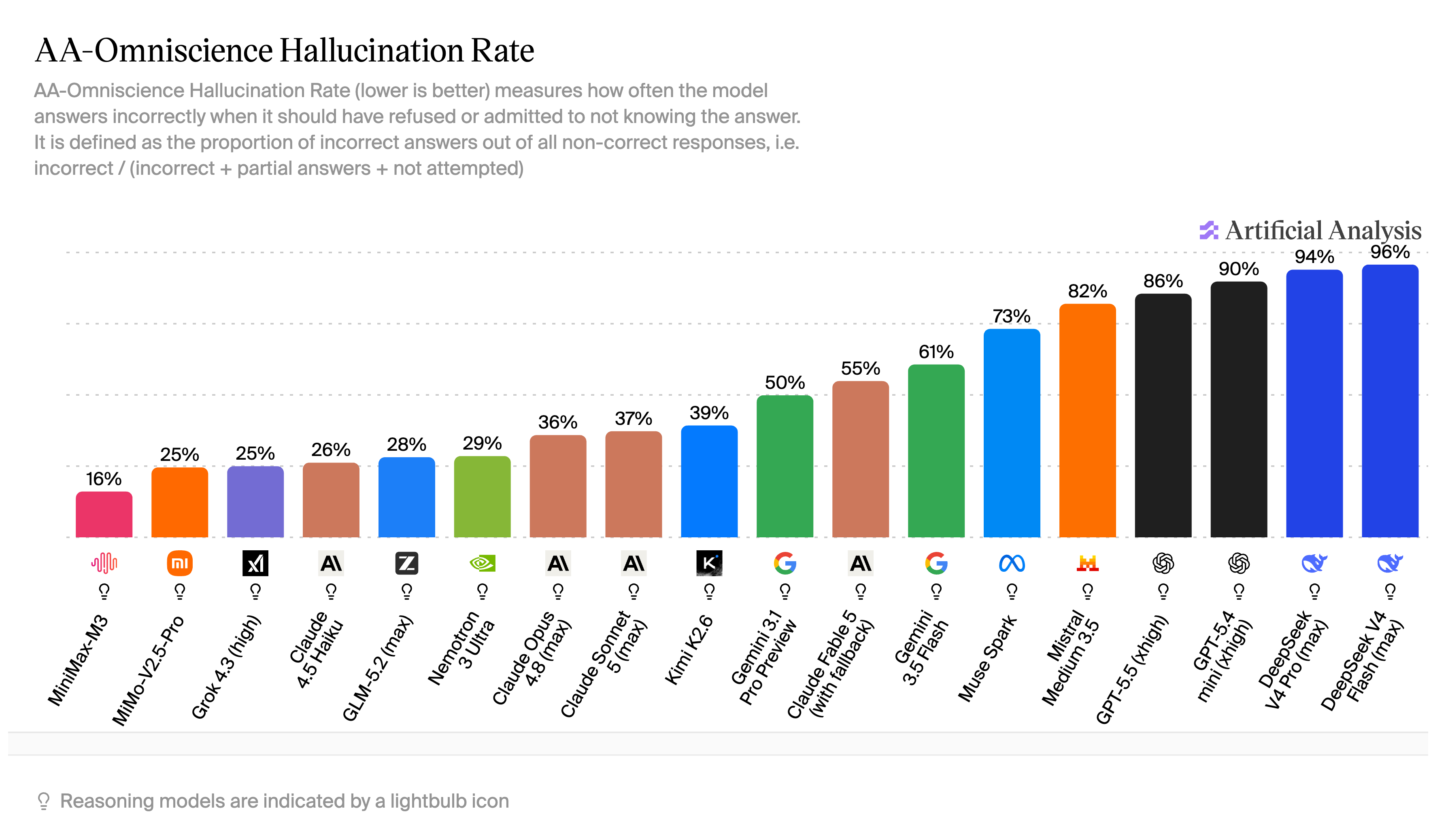
AA-Omniscience hallucination benchmark, via Artificial Analysis.
Keeping long-running MiniMax tasks practical
MiniMax M3 is strong enough that the bottleneck quickly becomes runtime efficiency rather than raw model quality. Once a task runs for dozens of turns, the agent runtime is what keeps things working.
The stagewise agent keeps the early part of the conversation stable across multiple turns, so the prefix stays the same from one request to the next. That improves cache hit rates and often lowers both latency and cost.
When the environment changes (files were changed, skills were enabled/disabled, etc.), the system does not resend the full context. If you rename a file, open a tab, or move a selection, it appends a compact state delta to the model context instead of rebuilding everything. The model still gets an up-to-date view of the workspace, but with far fewer tokens.
The runtime also automatically compresses context as tasks grow. Older turns are summarized and pruned so the model keeps a focused working set. That makes longer jobs feasible: multi-file features, refactors that unfold over hours, or debugging sessions for tricky issues.
Use MiniMax through a stagewise Account, the MiniMax Token Plan, or local inference
The default stagewise Cloud Inference is the easiest way to get started: with a stagewise Account, you get preconfigured access to MiniMax models alongside a wide range of other models, all without managing a separate API key.
If you want to get the most out of MiniMax specifically, the MiniMax Token Plan is the recommended option. You can set it up during onboarding, or later in the settings.
If you already have MiniMax access elsewhere, you can point the IDE at that setup instead. Existing API subscriptions, third-party endpoints, and local inference all work with the same runtime. See the custom providers docs for the setup details.
stagewise does not dictate where you buy inference. You choose the billing and hosting model that fits your setup.
Native vision meets agentic workflows
Unlike GLM or DeepSeek, MiniMax M3 has native vision capabilities. It can see and reason about images, screenshots, and design files — no workarounds needed. That makes it a natural fit for frontend work, UI debugging, and any task where the model needs to understand what something looks like, not just what the code says.
With stagewise, this becomes practical. stagewise agents can take screenshots of the website you are working on, send them to MiniMax M3, and the model can see what is on screen. The agent can then check visual output, improve designs, and resolve issues that require vision access — without you having to describe what you see.
Frequently Asked Questions
Both. stagewise is a coding agent orchestrator: it ships its own first-class, model-independent agent harness — the runtime that handles tooling, context management, file access, and multi-agent orchestration — alongside the user interface you use to control that harness.
The harness is model-agnostic, so it works with any capable model, including MiniMax. You get the IDE and the agent in one product.
You can run MiniMax in stagewise using three options:
- stagewise Cloud Inference: With a stagewise Account, you get preconfigured access to a wide variety of models including MiniMax M3, MiniMax M2.7, and MiniMax M2 — no keys, configuration, or external subscriptions required.
- Your API Key: Supply your own MiniMax API key, or use an API aggregator (like OpenRouter or fireworks.ai) to route your queries.
- Custom Endpoint: Connect stagewise to any custom endpoint — including local servers (Ollama, Llama.cpp), on-premise deployments (vLLM), or enterprise inference providers.
The models listed on the stagewise home page — MiniMax M3, MiniMax M2.7, and MiniMax M2 — are available out of the box. Beyond those, you can connect any additional MiniMax model that has agentic capabilities through your own API key or inference provider.
Yes. The MiniMax Token Plan is fully supported and is the best way to use MiniMax models effectively.
You can set it up during onboarding, or later in the settings at any time.
You can also switch between providers whenever you like — stagewise Cloud Inference, the MiniMax Token Plan, your own API key, or local inference — without losing your work or configuration.
Yes. You can connect models from any model provider API, including your custom model variants — whether fine-tuned, quantized, or otherwise specialized. See the custom models docs for details.
Yes. You can configure stagewise Agents to use models from any source, including a local setup using Ollama or an on-premise deployment in your own datacenter with setups like vLLM.
stagewise supports any inference provider option that serves models via one of the popular model access APIs like OpenAI Chat Completions API, OpenResponses API, or Anthropic Messages API.
The minimum recommended context size is 150k tokens.
Yes. stagewise offers the option to connect Azure Foundry, AWS Bedrock, and Google Vertex endpoints for enterprise-grade inference. See the enterprise page for more.